
My blog presents new innovations in computer software/hardware technology, linux related useful tips, review of some softwares, IT related achievements in Nepal.
Friday, February 25, 2011
A Twitter Bug with snipped URL

Sunday, September 12, 2010
Helping solve few problems in Nepal with Technology
- The portal can be used to highlight quality work being done and potential growth sectors
- Since the govt. support is unlikely to come (at least at the earlier stage), getting an endorsement by successful Nepalese with International branding like Prabal Gurung, Kiran Joshi and the Nepali diaspora will help
- It would be great if the site could be community owned and developed collaboratively on github or similar platform
- If ever, government agencies come forward, the ownership should be transferred to them
- I know many of us who are familiar with Nepal's present situation would be laughing at this idea and find it ludicrous. but believe me if we start to explore positive sides, we will definitely find some. We already have low wages, huge concentration of population in youth age-growth (see I found a few!). We don't necessarily have to eye for an investment from Google here today or a supply-chain business from Wal-mart. Nepal would begin growing even if we, say for example, manage to get car-seat cover factories (that is so trivial, isn't it but Nepal doesn't make them yet), electrical switch making companies, some hydro-power solutions.
- The idea is inspired (or you can say copied) from the following news story: http://www.iadb.org/news-releases/2010-08/english/pregnant-women-in-peru-will-improve-their-health-via-cell-phones--7708.html
- It can easily be implemented by a startup IT company in Kathmandu
- Would be a great service to do in a country where maternal mortality rate and infant mortality rates are very high
- The idea need to have major focus for rural areas
- Since reducing maternal and infant mortality rates are critical MDGs (Millenium Development Goal) for Nepal, getting some INGO to fund the cost shouldn't be difficult
- Can be easily done in partnership with a hospital
- This will be very useful as several rural women don't have access to hospital and the cases of teen age pregnancy are high
- The implementing organization can still make profit through SMS charges (though margin can be a bit low). However, I believe the social capital through such project would produce good returns in long run. And, moreover, it will help develop a market for SMS based services at the bottom of the pyramid (it is virtually non-existent in rural area at present and has great potential. One has to only connect to the kinds of services that would matter to rural population).
Monday, April 26, 2010
Google Bots are looking at you!!
We all know of the enormous amount of data Google stores about so many things. But today I ran across something that I hadn't imagined Google bots were stalking at.
A picture is worth thousand words. Hence, lets see this screenshot of my Gmail account.

In the email thread (http://groups.google.com/group/foss-nepal/browse_thread/thread/2725fc8a421c90b8) I had proposed an IRC meeting on Tuesday at 8 PM. I was surprised to find "Add to Calendar" suggestion with those details (I have noticed this feature for the first time.) It is just so wonderful and genius of engineers at Google to suggest you to add the event to you calendar, isn't it?
Even before, I add the event to calendar, Google still has an idea of the fact that I am having a meeting at the specified time and venue.
Google bots might over period store so much of information about your meetings that it might be able to tell you when exactly you went on date with and when.
Thursday, March 25, 2010
Is Google experimenting Video Ads in Youtube?
For sometime now, Google has been vigorously experimenting variety of ads on Youtube. Anyone who has used Youtube in past 3-4 months (I don't exactly remember when Google launced it and I am too lazy to search ;) ) must have at least noticed the text based ads that appear at the bottom of videos.
Today, while trying to follow the Google-China Saga, I clicked upon a video link to notice L'OREAL ad being bombarded at me.
For a moment, it seemed I clicked wrong link. And, in a while, the video I was looking for actually appeared. For a moment, I thought that it might have been uploaded that way by the video submitter. Hence, I refreshed the page to be greeted with PEPSI ad.
This seem to be a new advertising methodology Google is experimenting in its lab! I am not sure how people will react to it but for the time being, I am loving the idea.
Wednesday, January 21, 2009
e-libraries in Udaypur and Lamjung
While the Lamjung project was solely carried out by HeNN, Udaypur project was financed by Save the Children-Norway and HeNN looked after the implementation. FOSS Nepal provided the technical assistance in the projects.
I have been associated with HeNN since the days I volunteered for establishment of e-library in Sudal, Bhaktapur and it has been more than a year now. But working this time was a different experience all together. With Roshendra Dai and Shishir Dai gone for further studies, I was transferred the responsibility of technical co-ordinator for the projects. So, this time, I was in charge of affairs right from purchasing hardware, co-ordinating with volunteers to communicating with Save the Children-Norway. Of course, I also had to deal with technical issues in the setup and content for the e-library. Handling all these responsibilities parallely was tough but a good learning experience.
In the Udaypur deployment, we had a team of 4. Me, Suraj, Mitra Rai and Khem Rai. The project was accomplished in Shree Rauta Higher Secondary School, Murkuchi. In Lamjung, Sushil Shilpakar led the team, with Sanjeev KC, Dipesh Shakya and Kailash Budhathoki as other team members.
There were lovely moments as well as tough moments during the project. But the accomplishment of the projects is definitely a thing we feel proud of since this has created an opportunity of learning Information Technology for at least 1000s of students who will be helping hands in the nation-building tomorrow.
And the beauty of these projects is that they are solely based on Open source and implemented using LTSP (Linux Terminal Server Project) which greatly reduces the cost which is a key concern in nation like ours. Moreover, we have tried to ensure that the setup is more than just a computer lab. With contents like gCompris, Student Wikipedia, e-Paath developed by OLE (Open Learning Exchange), eBarnamala, Kalzium, etc. the setup is a supplement to the traditional library. Hence, we call it an e-library.
I am pretty sure that this mission of "1 e-library per district" will give several young minds an opportunity to be aware of the power of Information Technology and connect them to the global phenominon. This definitely is a reason for me to smile and feel good about these deployments.
Wednesday, December 17, 2008
LTSP Training of Trainers conducted
The vision itself is very innovative since it not merely empowers rural Nepal but also students of technical institutions who are given opportunity to go to different parts of Nepal to set up the e-library. Since, not much students are familiar with the use of this technology, a training was conducted. This was the second training on LTSP being conducted, last one being conducted on 15-16 December '07. I was part of the instructing team for both the training events.
I have made a blog post of the training @ http://elibrary-ltsp.blogspot.com/2008/12/2nd-ltsp-training-of-trainers-conducted.html
Monday, December 1, 2008
Classifying data to class interval using AWK
Thanks to my counting skill (or probably it was concentration), I ended up finding different frequencies for the class-intervals each time I counted.
I knew I would never complete the assignment if I continue counting. I thought I would better go for a script to do counting for me. And hence, I wrote a small one for myself using awk.
I copied the discrete data in a plain text file called dataset. The data was separated by a blank space and looked like this:
07 05 96 14 10 90 ..............
Had to write only a few lines of code to do the trick for me. In the class interval, I had to include the maximum class limit and exclude the minimum class limit. Wrote the following code in a file called class.sh and executed it.
The output of the script would look like this:
#!/bin/bash
awk '
{
for(j=1;j<=NF;j++){
p[int(($j-1)/10)]++;
}
print "Class Inverval","\t","Frequency";
for(k=0;k<100;k+=10){
printf("%2d lt; r <= %3d",k,(k+10));
printf("\t\t%2d\n",p[int($k/10)]);
}
}' dataset
Class Inverval Frequency
0 < r <= 10 8
10 < r <= 20 13
20 < r <= 30 8
30 < r <= 40 12
40 < r <= 50 7
50 < r <= 60 8
60 < r <= 70 8
70 < r <= 80 8
80 < r <= 90 12
90 < r <= 100 11
Easy, huh? Isn't it.
Wednesday, November 26, 2008
FOSS Nepal wins best SFD '08 event for consecutive year
Today, it was a day of wonderful surprise for the FOSSians here.
The results of the best SFD (Software Freedom Day) events was announced and guess what we have managed to stand one of the best SFD events team for the second time in a row!
Thanks to the effort put by together by the collective effort of volunteers. Bibek Paudel ensured that our effort were properly logged in a report to be submitted. And here we are!!!
SFD announces three best SFD events team every year (in no particular order). The other two teams who managed to tell precisely how they managed the event were: SFD Nicaragua and DabaweGNU. The information is available at :
http://softwarefreedomday.org/Competition2008
FOSS Nepal was declared one of the best events even last year ('07) along with SFD Nicaragua and Beijing SFD.
SFD was celebrated throughout the world on September 20 this year. You can find a post about activities in this year's event in Nepal on Pravin Gautam's weblog
Everyone is enthralled and we will soon be having party to celebrate this victory!!! And, now that we have tasted the fruit of success, we are looking at making a hattrick. :)
Friday, November 21, 2008
A week long journey to hightech rural Nepal
But then I was a bit hesitant since I needed to miss college for at least 10 days. I talked about this to Suraj, Manish and Shishir Dai. Everyone said that I should go. And so I was ready for a lifetime experience.
We started our journey from Kathmandu on Nov. 17 and had a night stay at Beni. The next morning we had to trek for 10 hours to reach our destination, Nangi. It has been the most difficult trek of my life till date but such a beautiful place is worth every pain.
The view of Annapurna South, Annapurna II, Dhaulagiri, Gurja Peak all make you feel like a heavenly creature.
While you trek, you wonder if you would even find salt at such a place, you will be amazed that most of the villagers use VOIP as the sole telephony medium. Most of them are good at emailing, chatting and you would find most of the communication in the neighbouring villages taking place through forum on a local webpage. What more, they have a tele-medicine centre.
I was really stunned to see this hightech village. And despite this all, they are so friendly to you.
The training was arranged by ENRD (E-Network Research and Development). Uttam Sir and Ambika Madam from ENRD accompanied us.
While Basanta Dai needed to discuss the new features in Nepalinux 3.0 like Text-to-speech, Nepali Sabdakosh, Nepali spell checker in Open office as well as GIMP, English/Nepali Wikipedia, Web Domain Registration, I was assigned the task of teaching Blogging and Website building using CMS. I chose Drupal (http://www.drupal.org).
From the next day, we had to start the training session. And, it was supposed to be a 9 day training session.
The trainees (or probably I say trainers since it was a Training of Trainers programme) were from 5 different locations namely: Krishna Sir, Kishan Sir and Boj Sir from Nangi (Myagdi), Sete Sir and Yamshree miss from Shikha (Myagdi), Narayan sir and Amrit ji from Tolka (Kaski), Shivaram Sir from Dandagaun (Rasuwa) and Chhanu Sir from Jhuwani (Chitwan).
In these 9 days, we got along very well with everyone and it was all fun inside and outside the class. We would take classes from 9.30 AM to 4.30 PM with an hour break and would then go for walk around village.What more, we also got to participate in the traditional Magar dance. I am glad that I got to experience all this.
In the meanwhile, Amar Sir from MPP joined us on training on 8th day while on his way to Ghorepani with his friends. We organized a small feedback session. And it was pretty good that we received good remarks about the training from the participants. Only the complaint that the participants had was that the curriculum in schools had to be Vendor independent so that they themselves had the opportunity to use Nepalinux regularly and teach their pupils. We assured that we would do the best we can. By the way, let me bring it to your notice that we are already putting the curriculum issue before CDC (Curriculum Development Committee) and I am taking charge on this front on behalf of FOSS-Nepal.
By the end of the training, the participants from the centers had developed the center's respectives sites. The following are the links to the sites:
Dandagaun -- http://dandagaun.com.np
Jhuwani -- http://jhuwani.com.np
Nangi -- http://nangi.com.np
Shikha -- http://shikha.com.np
Tolka -- http://tolka.com.np
Well, I have a lot to say, but let photos express it in a better way.
http://www.flickr.com/photos/jitendra-pic/sets/72157609561027757/
Thursday, November 20, 2008
GMail launches themes
Just today, when I was about the check my mails, I read the feed of GMail blog that talked about launch of Themes in GMail. I was so excited by the thought. I signed in to find no 'Themes' tab under Settings.
I went through the whole article to find that Google was updating each account and the process may take some time. And hence, it was a long long day for me. Then, finally, I got to see 'Themes' tab in the Settings which looked like this.
Themes tab with 'Mountains' Theme activated.
What more, some of the themes work with your local time. Like the 'Beach' theme would change the appearance of your GMail to simulate the look of a beach at your local place.
There is a theme for everyone. Even a theme called Terminal for console fans and geeks!!!
So, I am a much more happy GMail user now :)
Monday, October 20, 2008
Dynamic svg graphics using PHP
The SVG format is an XML based open standard for Vector Graphics. The XML format makes SVG a powerful resource for dynamic graphics with the help of some programming or scripting language. Many web browsers now support SVG format. All you have to do is include the following header:
header('Content-Type: image/svg+xml');
Let me present a small demo to give you a glimpse of what can be done with SVG and PHP together. I have used a very simple example with minimum graphical components to make it easy to illustrate the concept. Though, there is huge possibility of making things better.
Say, if marks of a student in various subjects were to be presented in the format shown below, where the name of the subject and the marks are fetched from a database table, you would probably have used a complete graphics library package.
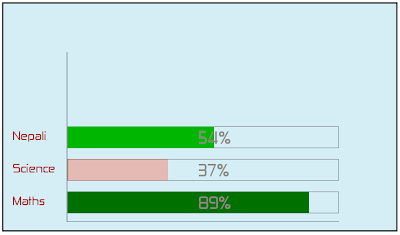
You would notice that the color intensity of the bar graph for various subjects are different. I have chosen 40 to be pass marks. Anything below it would be rendered in red with highest intensity for 0 marks and lowest for 39. And anything above it would be rendered green with lighest intensity for 40 and it gets darkest at 100. The number of subjects are also dynamic.This task can easily be performed using svg graphics and php. So, where do I begin?
Well, writing the complete xml script for svg by yourself may be difficult if not impossible. The best way is to draw the initial framework using Inkscape or any other Vector graphics tool. I drew something like this.
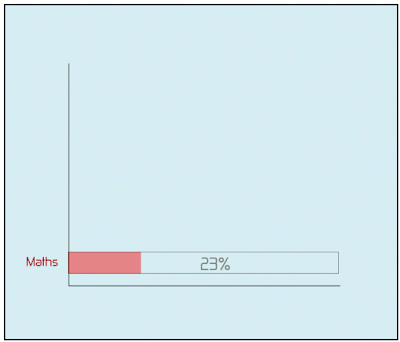
Don't worry about the accuracy of color intensity and percentage. We will leave the mathematics for PHP. And you don't need to be accurate about positioning and other stuffs. You can always edit them later. All you have to do is prepare basic framework.If you notice properly, you would identify that there are 4 components that are dynamic for our purpose. The text that writes "Maths" (it will be fetched from database), the container for the bar (it will have to be replicated for all the subjects), the bar itself (besides being replicated, it will have varying color and width) and the percentage text of course. Note down the id of these components from the graphics tool you are using.
Now, open your svg file in some xml editor (almost text editor would open it). Copy the whole script. Create a PHP file as follows:
<?php
header('Content-Type: image/svg+xml');
mysql_connect(HOST,USERNAME,PASSWORD);
mysql_select_db(DB_NAME);
$query="SELECT * from TABLE"; //TABLE has two fields: subject and marks
$result=mysql_query($query);
$count=mysql_affected_rows();
echo 'PASTE THE COPIED TEXT HERE';
?>
The code above should be self explanatory. Now, locate the section of the dynamic components and keep them in loop as:
for($i=0;$i<$count;$i++){ $subject=mysql_result($result,$i,subject); $marks=mysql_result($result,$i,marks);
.................................
}
Now, the tasks that you will have to undergo are as follows:
1> Make the y value of all those components dynamic as every subject will appear at different value of y. Something like this:
y="'.(405.21936-$i*60).'"
2> Replace the static text 'Maths' with $subject and '23' with $marks.
3> Vary the width of bar component.
width="'.($marks*5).'"
4> Now all we have to do is vary the color of the bar to meet our requirement.
It was done as follows:
style="opacity:1;fill:';
if($marks>=40)
echo '#00'.(dechex(210-2*($marks-40))).'00;';
else
echo '#f82d00;';
echo 'fill-opacity:';
if($marks>=40)
echo '1';
else
echo (1-$marks*195/(255*39));
echo ';stroke:none;stroke-width:0;stroke-miterlimit:4;stroke-dasharray:none;stroke-opacity:1"
While I chose a certain sort of colors to depict on the graph, you can choose your own sets of color. If you go through the above code carefully, you would easily realize how the colors were generated.
While this should have given you an idea about the power of svg, you can refer to more resource on integrating svg with php at svg.org's wiki with complete source code.
So, if you are a nice designer with good programming skills, you have both your hands in a pool of treasure now!!!
This article has also been published in the first issue of 'The init Magazine' released by IOE FOSS. The magazine can be downloaded from http://ioefoss.ioelive.com
Monday, September 29, 2008
Managing your mails with Labels and Filters
Hey! in case you have a gmail account, it was never that difficult to be receiving the discussions in your mailbox without bothering to locate an important mail in an ocean of mails from the group. The task can be easily accomplished with the help of Label and Filter. Not just groups, you can also you it to filter your mails as per your convenience.
Let me tell you the way to vanish away the cause of your daily migrane.
Go to Labels->Edit Label link from Left panel or Settings->Labels from the top bar.
Type the name of the label in the text box accompanying 'Create' that you would want to associate with your mail filter. You can choose any name you desire. And press Create button.
For example, if you wanted to filter all the mails from ioefoss google group, you could name the label IOE-FOSS or anything you deem suitable.
Huh! will that filter the mails from ioefoss in my mailbox? No not yet, you have just created a label, you need to filter the mails now.
Now, choose Filters from Settings. And click the link 'Create a new filter'.

So, you see so many criterias for filtering your mail. You can filter on the basis of the sender, receipant, subject, etc etc.
So, if a friend of you frequently communicates to you and you want to filter the mails from him, you would simply type in the email address of your friend in the 'From' textbox.
And in case, you wanted to filter the mails from google groups, you would type in the email address of the group in 'To' textbox.
For eg, to filter your emails from ioefoss google group, you would type 'ioefoss@googlegroups.com' in 'To' textbox. If you are confused how to select the field for filtering the mails, you would better check the header of the mail and find something common the mails you want to filter. You can do this by clicking 'Show details' in your mails.
After this, click 'Next step' button.
So, now you have various ways of filtering the mail.
If you wanted not to receive your filtered mails in your inbox and directly go the the Label, check 'Skip the Inbox' and then 'Apply the label'. In our case, the label would be 'IOE-FOSS'.
If you wanted to apply this for the prior communications, check 'Also apply filter to ___ conversations below'.
And that is all you had to do to get rid of your headaches. Simple, isn't it?
So, happy GMailing (thanks Dhruba for coining the term!!!).
Monday, May 12, 2008
Do you still love your old snake game?
Ok how about adding a timing limit indirectly by making you compete for a food which your friend in network also tend to occupy. That is making it go multi-player. Ah, now that sounds interesting. Want some more challenge? How about an intelligent snake which the computer controls and which is capable of determining the shortest path to food? Scared? Ain't you excited about it? Yup, there is a game that adds these feature to the snake game-iSnake. The project has been developed in Java. And just to let you know I am one of the developers of the game.
We developed this game as a part of our academic project and with the purpose of research in AI and real time gaming. But that doesn't mean we ignored factors like smooth gaming experience. We twicked the original swing components in Java to give the GUI a game like touch. The project uses Apache Mina Framework for communication. Besides, the game uses an algorithm for shortest path finding which we developed ourselves. The biggest challenge in the project was path computation in real time. Each game cycle is of 100ms and computing path within 100ms with other threads simultaneously running is really tough. Most of the path computations are rarely done in real time. We code- named the algorithm that we are currently using in the game as Viper. The game won the first prize at 'KUCC Software Meet 2008' and we participated with the project in 'LOCUS-Technical Fest 2008' for which the results are still awaited.
The game is hosted at sourceforge.net and has been released on 07 May. The game is registered under GPL and can be launched from web page using Java Webstart. You can find the complete documentation of the project including the path finding algorithm on the website.
So what are you waiting for? Browse the url: http://isnake.sourceforge.net, download the game. And get going. Give your friends a difficult time eating food. Happy Gaming!!!
Saturday, December 22, 2007
Extracting email addresses from multiple files
Now sending notification to everyone about their selection status was a problem. One option was to open the .txt file one by one then copy and paste the email address which was way too manual and time consuming (not less than 2 hours). Hence, we thought of an alternative.
I placed all the .txt files in a folder 'application'. Then I extracted out the lines that contained email addresses. The following simple yet powerful command did this for me.
jitendra@jitendra:~/application$ cat *.* | grep '@' > email_lines
cat *.* concatenated all the files in the directory and grep extracted the lines containing @. The output was directed to a file email_lines. The output contained lines like the one shown below:
(g) Email address: abc@gef.com
Though this command was sufficient to simplify out task and I could have done with it with more 15 minutes processing. But I wanted to go further experimenting and making the task more simple.
Now what I wanted was the section only after : from each line. This was accomplished using cut command. I went about like this.
jitendra@jitendra:~/application$ cut -d: -f2 email_lines>email_list
cut command remove the sections from each line of files. Here -d defined : to be the delimiter. -f was used to select the field. 2 specifies the field to the right of the delimiter : . 1 would have specified field to the left of delimiter. email_lines is the file from which the field section has to be removed. I directed the output to email_list.
Now I had a list of email addresses only. I preferred adding comma manually to them to create a comma separated list of email-addresses to send the notification.
The task which would have otherwise taken more than 2 hours was over in less than 10 minutes.
Sunday, November 18, 2007
GMail: Bigger and better
The change comes in less than a month after GMail raised its mail size from around 2800 MB to 4300 MB.With this, GMail makes it clear that size is never going to be a barrier in using GMail. Before you reach anywhere near the limit, you will get your mailbox size enlarged.
The improvements in UI are really a welcome change. Though the changes seem small, but I feel most of them are really awesome. Though I have not much explored the changes because of lack of time, the ones I liked are:
- The new color selection looks better than the previous one. Though the change in color appear only at few places.
- The change in position of Loading status display was long awaited. The previous design used to hide the Sign Out link in case of Loading.
- The contact info on mouse-hover is really a great feature.
Saturday, October 27, 2007
Brand your Site with Favicon
A favicon (short for 'favorites icon'), is an icon associated with a particular website and is displayed in URL bar, in the list of bookmarks and next to page title in tab-enabled browsers in a favicon enabled browser. Basically, favicon is a 16x16 pixel icon. 16x16 pixel is too small size but it can contain something really meaningful and attractive.
While Internet Explorer supports only .ico format, Firefox, Opera, Flock, etc support .png and .gif as well. So, if you are using static favicon, it is advisible to go with .ico file to have support for all browsers.
Firefox has even added support for animated .gif files. It won't be a big surprise if other browsers also add support for them in their new releases.
To have one on your webpage, go through the following steps:
- Create a 16x16 or 32x32 pixel ico/gif/png file and name it "favicon.xxx" where xxx is suitable extension.
- Include the following tag in the head element of the webpage if you are using .ico image.
- <link rel="shortcut icon" href="favicon.ico">
- If you are using .png or .gif image, use the following tag instead
- <link rel="shortcut icon" href="favicon.xxx" type="image/xxx"> where xxx is proper file type (gif/png).
Friday, October 19, 2007
Auto-forwarding mails from GMail to other mail accounts
Sign in to your Gmail account.
Click Settings on the top-right of your Gmail page.
Choose Forwarding and POP tab.
In the "Forward a copy of incoming mail to" textbox, write the email address where you want your emails to be forwarded. Choose one of the following as per your convenience from the drop down menu:
- Keep Gmail's copy in the inbox
- archieve Gmail's copy
- delete Gmail's copy
The screen shot below illustrates the task.

I am sure that was fun. Want some more? Ok, now I tell you to selectively forward the mails from Gmail inbox to other mailbox.
Choose Settings->Filters.
Click "Create a new filter".
Enter the criteria of filtering your mails.
Choose "Next step".

Provide email address where you desire to receive mails meeting the criteria you entered to "Forward it to:" option and check the option.
After this click on Create Filter button.

And you are done.
Was not that interesting? But I am sure you would not want to have your gmails in other accounts. Wish the other way round was true i.e., mails from other account could be auto-forwarded to Gmail.
Thursday, October 11, 2007
3D Modelling and Animation
If flash movies and animations are something that fancy you, you will surely love this: Animation and movies in 3D!!! According to a survey, global animation and gaming market was of 100 billion dollars in 2006 and the projection estimates this to grow to double by 2010. May be next time you think of making a model, an animation or a game, you use the softwares I tell you about. Believe me, it is much more effective.
Ever heard of 3Dmax or Maya, popular 3D animation softwares? While these are the good options, I prefer Blender-a free and open source 3D content creation suite. Primarily, because it is available for all the major OS: Linux, Windows, FreeBSD, Solaris, Mac OS X, IRIX. Another important feature of this suite is its extensibility using easy to use popular C and Python language unlike 3Dmax that requires Maxscript particularly created for this software for extensibility. For comparisons on different 3D development softwares, refer to:
http://wiki.cgsociety.org/index.php/Comparison_of_3d_tools.
Blender has got loads of features that allow modeling, skinning, UV unwrapping, texturing, rendering, non-linear editing, animating, etc. Moreover, it has got advanced simulation tools for rigid body dynamics, fluid dynamics, soft-body dynamics.
It has variety of features for primitive geometry like subdivision surface modeling, NURBS surfaces, Bezier Curves, can be integrated with YafRay, a free and open source ray tracer. The modifiers allow non-destructive effects. The key-framed animation includes inverse kinematics, non-linear animation, particle system with collision detection, etc.
The most amazing feature of Blender is Game Blender, a sub-project, that allows interactivity features. With collision detection, dynamics engine and programmable logic features, one can create stand-alone, real time applications of all sorts including high-end games.
Another great feature of Blender is an internal file system that allows to integrate different scenes in a single file with extension .blend. All images, textures are within a single file. Moreover, .blend file made in one version has good compatibility with the other version and blender on other platforms.
This software has improved a lot in the aspect of User Interface. While earlier versions required one to do almost everything through keyboard shortcuts, new versions are robust with menus.
I have only recently started learning Blender and found it very useful and easy to learn (but you need to go through proper tutorial for sure). Blender foundation is really working hard on improving the documentation. Tempted to give it a try but wondering where to start from? You will find the tutorial at here useful.
Communities have strongly been contributing in this aspect. There are many communities who can help you learn blender and solve your queries regarding it. Moreover, you can have a downloadable magazine with issues in 3D development at : http://blenderart.org.
So, don't stop yourself. Get going and add a new dimension to your knowledge.
Saturday, October 6, 2007
Configuring Kopete for Google Talk
Start Kopete.
Choose Settings->Configure...
Select Accounts from the left navigation bar.
Select New...
The screen should appear like this one.
Choose Jabber and click Next.The next screen should be like the one shown below:

In the Jabber ID, enter your complete google account ID. For eg, I would enter jitendra.harlalka@gmail.com for me. Choose Remeber Password as per your convenience. In case you choose it, provide Password in the TextField. Similarly, you can choose Exclude from connect all and Exclude from Global Identity as per your convenience.
Now, choose Connection tab. It should look like this one.

Check Use protocol encryption (SSL) and Override default server information. Type talk.google.com in the Server TextField. Keep Port to 5223. Click Next.
Choose color for your google talk ID. Click Finish button. You should find yourself online if you are connected to internet connection.
Tuesday, September 25, 2007
Finding fastest mirror/site
Perhaps, speed and efficiency will be the factor for you. But, how to know which one will be the fastest and efficient mirror?
The answer to this question is netselect. This package chooses the fastest server automatically. On providing space separated list of sites, it chooses the fastest server. The calculation involves various factors like ping time, number of hops required to reach the target, the percentage of ping requests that got through successfully.
For example, say you want to download apache from its official site. You will be provided with a list of mirrors (you will be provided with a suggestion for best mirror-site but lets ignore that for the moment). I chose to find the fastest one out of 3 mirrors: http://apache.mirrors.hoobly.com/ http://apache.hoxt.com/ http://veritris.com/mirrors/apache/ .
So, I typed
$ sudo netselect http://apache.mirrors.hoobly.com/ http://apache.hoxt.com/ http://veritris.com/mirrors/apache/
which gave me output
2175 http://apache.mirrors.hoobly.com/
Hence the fastest one out of 3 was found.
Actually, netselect gives score to each mentioned server on the basis of various factors. The lower the score is, better is the server response. Now, to know the score of each server, run netselect in very verbose mode with -vv option. For more information on netselect, refer to netselect manual.
Also try netselect to check fastest search engine at your location by supplying a list of search engines with the netselect command.
Netselect will definitely make your life easier especially if you are using slow dial-up connections.
N.B.: I tried this command on Debian based Distro, Ubuntu. This command works on Debian based systems but I am not sure about rpm based systems.


